
Limecraft Edge is a native desktop application designed to securely handle media-intensive workflows on set, on location, or in post-production environments. It enables efficient and secure offloading, backing up and ingesting media to local storages and the collaborative Limecraft Workspace. Edge supports workflow automisation and configuration to allow streamlined and efficient media handling. It includes checksum verification, audio sync, multi-cam workflows, encoding proxies, LUTs and watermarks.
This article explains the main capabilities and benefits of Limecraft Edge.
Limecraft Edge is the Swiss army knife for data handlers. Whether you are using Limecraft Production Workspace or a third party Asset Management system to manage your moving and still pictures, making sure your media is transferred to the right destination (including the right metadata and right file formats) is a challenge.
Edge enables you to:
| Securely manage media offload: Automate backups, audio synchronisation, and colour grading while creating viewing proxies. |
| Organise large-scale ingest: Handle high volumes of media using predefined folder structures for seamless searching. |
| Enable instant collaboration: Make rushes viewable from anywhere by automatically uploading web proxies to your Limecraft workspace. |
| Maintain data integrity: Track storage locations for easy relinking in edit suites and automate advanced workflows like pre-cutting and archiving. |
Typical Use Cases for Limecraft Edge
Limecraft Edge supports a wide variety of workflows, from remote offloading for distribute teams to semi-automated pre-editing. Below, we outline the most common use cases: from simple offload and viewing proxy creation to the addition of edit proxies for local storage. For more inspiration, please explore our dedicated section on advanced use cases.
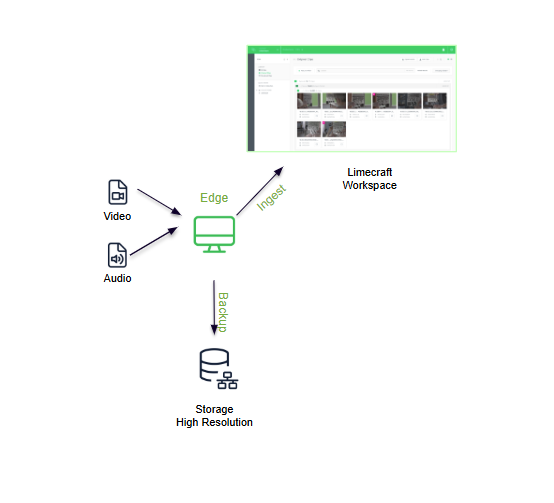
The diagram below illustrates the standard workflow for using Edge: media offload, synchronisation, and the creation of viewing proxies for the collaborative Limecraft Workspace.
NOTE: It is perfectly possible to offload multicam content with Edge. Edge accurately syncs multicam content and generates synced proxies for viewing and editing.
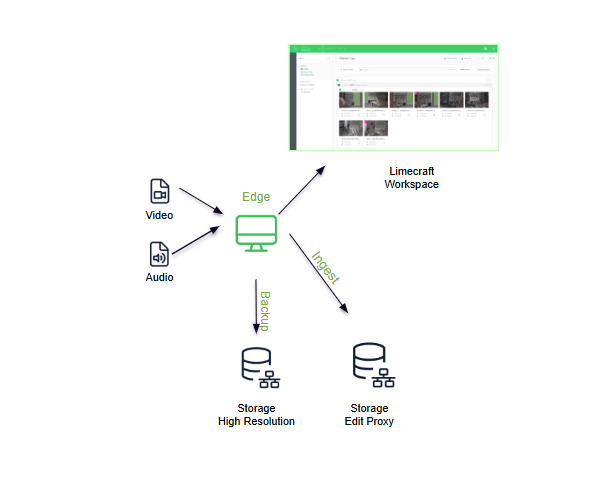
Below is the use case for additionally creating edit proxies on local storage (such as a NAS) for use in the edit suite. Edge tracks these locations, allowing you to:
- Create a preselection or a pre-cut in the Limecraft Workspace.
- Export an AAF to Avid Media Composer (or similar), which will automatically link with the edit proxies on your local storage.
Let's have a look at the basic capabilities of Edge step by step.
Backup
Whether you're responsible for handling the rushes on a high-end film set or when you just want to make some copies, you may want to secure one or more copies of the rushes before anything else.

With Edge you can seamlessly:
- Make one or more copies to specific pre-defined destinations.
- Secure the data integrity before and after copying with checksum verification.
- Proceed instantly to ingest to predefined file types and destinations.
Audio synchronisation and handling Multicam Material
For multicam content and separately recorded audio, Edge supports media sync and accurately creates group clips for viewing and editing.

Quality Control
The library section of Edge gives you the option to inspect the visual or audio quality, as well as the technical and descriptive metadata. There is also a built in player to view your content.

Ingest
With the built-in ingest application of the Limecraft Edge, you can transcode and transfer your content in predefined file formats and to predefined locations. These are managed in the project settings in your Limecraft Workspace.
A common use case is to create web proxies for viewing on the Limecraft Workspace and Edit Proxies in a local storage or a travel disk. Depending on the available CPU power, Edge can handle several transcoding and transfer processes in parallel.

Import
In case the backup and ingest processes are executed on different machines, you need to "import" the backup on the second machine that is responsible for executing the ingest. During import, the integrity of the files will be double checked.
Download
Beyond automating the encoding and ingest of rushes and dailies, Edge can also be used to download content from the Limecraft Workspace for editing or further processing. Downloading via Edge maintains the correct file structure, which is essential for ensuring seamless relinking during later stages of the editorial process.