
Follow these steps to create your Limecraft account, select a subscription plan, add any optional resources, and complete your billing information. You can sign up online for a Pay as you Go, Pro or Team plan. For Enterprise subscriptions, integrations or more complex workflows, contact the Limecraft support for assisted onboarding.
TABLE OF CONTENTS
- Before you Begin
- 1. Signing up
- 2. Verify your Email Address
- 3. Select Your Plan
- 4. Add Optional Resources
- 5. Billing & Payment Information
- 6. Next Steps
- Frequently Asked Questions
Before you Begin
To sign up for a Limecraft subscription, you need a valid email address and your billing information. During the sign-up process, you will create your Limecraft account, select a subscription plan, add any optional resources and enter your payment information.
Pay as you Go, Pro and Team subscriptions can be activated online. For Enterprise subscriptions, integrations or more complex workflows, contact Limecraft to arrange assisted onboarding.
Make sure you use the correct username and email address when creating your account, as these details will be linked to your Limecraft account.
1. Signing up
You can create a Limecraft Account and activate a subscription via the Limecraft website or via the following link: https://platform.limecraft.com/#auth/signup.

If you encounter any issues, please contact support through our support portal or chat.
Note: For more complex use cases or integrations, feel free to contact us to initiate the onboarding process at info@limecraft.com.
Choose a user name and password and fill out your email address to sign up.

NOTE: Pay attention to the username and email address that you choose at this stage. These will be linked with your Limecraft account from now on.
2. Verify your Email Address
After creating your Limecraft account, you may be asked to verify your email address. Open the verification email from Limecraft and follow the link to confirm your address.
If you do not receive the email within a few minutes, check your spam or junk folder and confirm that you entered the correct email address during sign-up. You can request a new verification email from the Limecraft platform if necessary.
Your account may remain restricted until your email address has been verified. Contact Limecraft Support if you are unable to complete the verification process.
3. Select Your Plan
Choose your plan from one of the three options: Pay as you go, Pro or Team. You can find more information about these options here.
Additionally we offer Enterprise plans to meet more demanding needs regarding complexity and capacity. For these we advise you to contact us by sending an email to info@limecraft.com
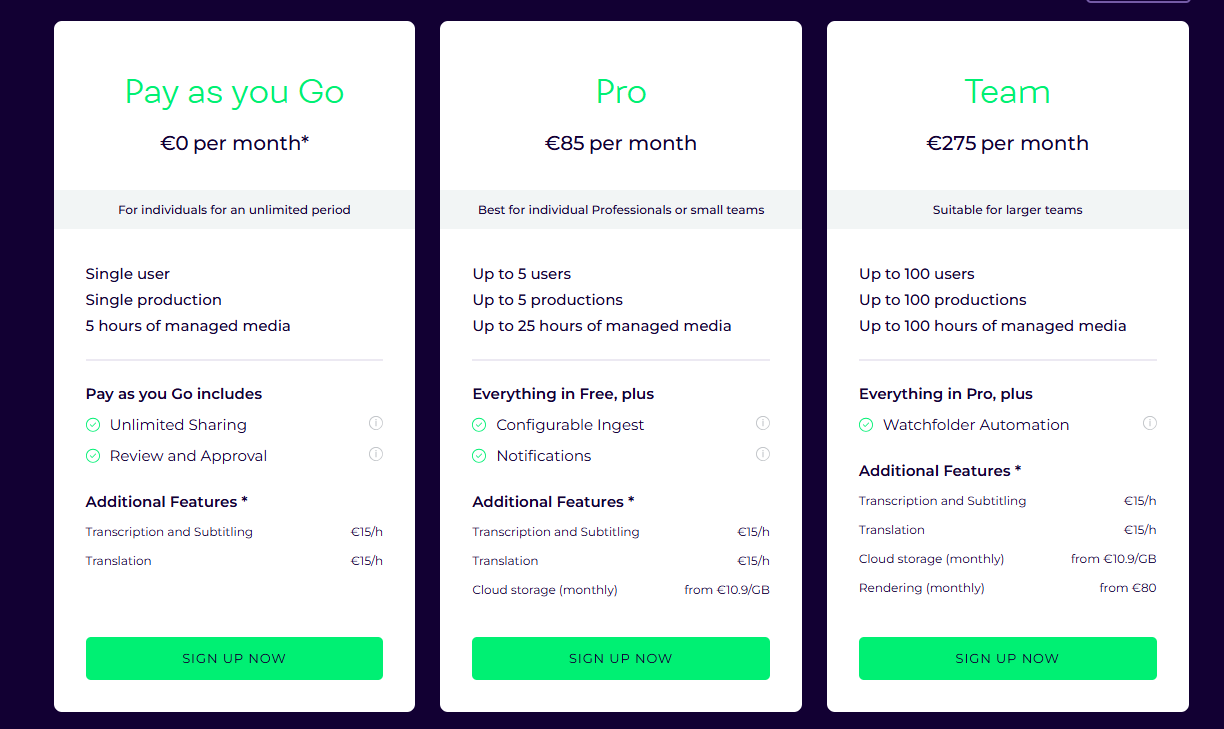
4. Add Optional Resources
Next, you will have the option to include additional resources such as Cloud Storage or Subtitle Rendering *.
*As of Team and Enterprise plans.

5. Billing & Payment Information
Fill out your billing information including your VAT number if applicable. When this step is finished, the tax will be calculated automatically in the Order Summary on the right side of the screen.

The final step to validate the subscription is to add valid credit card details as the payment method. If you prefer an invoice, please contact support by sending an email to support@limecraft.com or chat.

By confirming the payment, your subscription is activated. This can take a few seconds.
If you didn't validate your email yet, the system will remind you about checking your mailbox to validate it.
6. Next Steps
Once your subscription is active, you can continue setting up your Limecraft environment:
- Sign in to Limecraft.
- Create a workspace.
- Compare Limecraft subscription plans if you want to review or change your selected plan.
- Learn more about Limecraft accounts, productions and subscriptions.
- Configure Limecraft Cloud Storage if extra storage is required for your work.
Frequently Asked Questions
Which Limecraft subscription plans can I sign up for online?
You can sign up online for a Pay as you Go, Pro or Team subscription. Enterprise subscriptions require assisted onboarding and are intended for organisations with more complex capacity, security or integration requirements. Contact Limecraft for more info.
Do I need a credit card to create a Limecraft subscription?
A valid credit card is required to complete the standard online subscription process. If your organisation prefers to pay by invoice, contact Limecraft Support before completing your subscription.
Do I need to provide a VAT number?
Enter your VAT number if it applies to your organisation. Any applicable taxes are calculated automatically and displayed in the order summary before you confirm your subscription.
Can I add more storage or other resources?
Yes. During sign-up, you can add optional resources such as Cloud Storage. Subtitle Rendering may also be available, depending on your selected subscription plan.
Can I change my subscription later?
You can review your subscription and resource requirements after activation. Contact Limecraft Support if you need assistance changing your plan, billing arrangement or allocated resources.
Why do I need to verify my email address?
Email verification confirms that you have access to the address linked to your Limecraft account. Your access may remain restricted until the verification has been completed.
What should I do if I do not receive the verification email?
Check your spam or junk folder and confirm that you entered the correct email address. You can also request a new verification email from the Limecraft platform. Contact Limecraft Support if the problem continues.
How long does it take to activate my subscription?
Activation normally takes only a few seconds after your payment has been confirmed. You may then be asked to verify your email address before you can use all account features.
Can I use a different email address or username later?
The username and email address selected during sign-up are linked to your Limecraft account. Choose them carefully and contact Limecraft Support if they need to be changed.
When should I contact Limecraft for assisted onboarding?
Contact Limecraft if you require an Enterprise subscription, custom integrations, advanced workflow configuration or support for a more complex deployment.
Is the material I upload to Limecraft kept private?
Yes. Limecraft treats your uploaded media, content and metadata as confidential and does not share them with third parties for their own purposes. Your material is only accessible to people you authorise, for example by inviting them to a workspace or creating a shared link.
Limecraft may use carefully selected service providers to operate and maintain the platform. These providers may only process information as required to perform their services for Limecraft and are subject to appropriate confidentiality and data-protection obligations. For more information, see the Limecraft Privacy Policy.