
Limecraft allows workspace administrators to choose between two translation optimisation modes: Speed and Accuracy. These modes determine whether translation workflows prioritise faster processing times or higher-quality translation results.
Before You Begin: Required Permissions
To configure translation optimisation mode, you must have Account Administrator permissions.
Translation Optimisation Modes Explained
Translation Optimisation Mode determines whether Limecraft prioritises faster processing or higher-quality translation results. An Account Administrator can choose between Speed and Accuracy modes.
| Speed | Use Speed mode when turnaround time is the primary concern. This mode prioritises faster translation processing and is recommended for high-volume or time-sensitive workflows. |
| Accuracy | Use Accuracy mode when translation quality is the primary concern. This mode uses higher-quality LLM language models where supported and may result in slightly longer processing times. |
Configure Translation Optimisation Settings
The translation optimisation mode is configured at workspace level and applies to all translation workflows within that workspace.
To configure the translation optimisation mode:
- Navigate to Workspace Settings > Transcriber > Translation.
- Under Translation, select one of the following options: Faster Translations, Higher Quality
- Save your changes.
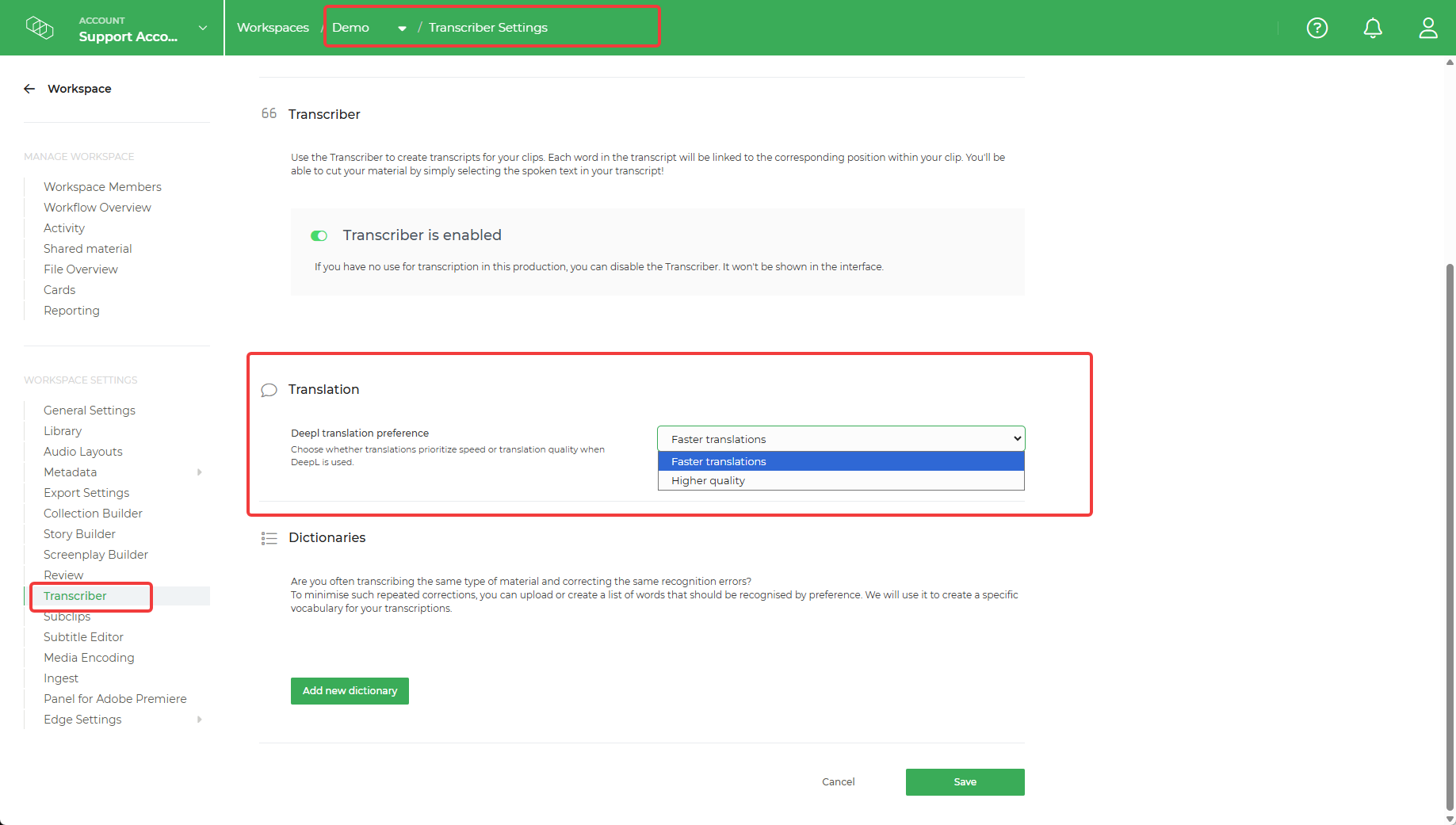
Note: Some languages do not currently support the Higher Quality mode. For these languages, Limecraft automatically falls back to Faster Translations.
Frequently Asked Questions
What happens if Accuracy mode is selected for an unsupported language?
Limecraft automatically falls back to Speed mode and continues processing the translation.
Does the translation optimisation mode apply to all projects?
No. The setting is configured at workspace level and applies to translation workflows within that workspace.
Can I switch between Speed and Accuracy modes?
Yes. Account administrators can change the optimisation mode at any time from Workspace Settings.
Why can't I see the Translation Optimisation Mode in Transcriber settings?
You must have Account Administrator permissions to view the Translation Optimisation Mode in Transcriber settings.